
What You Can Do with the API
This guide explains how to connect and what choices to make. All endpoints, fields, and examples are listed in the complete technical reference at crm.credifin.nl/api/docs.
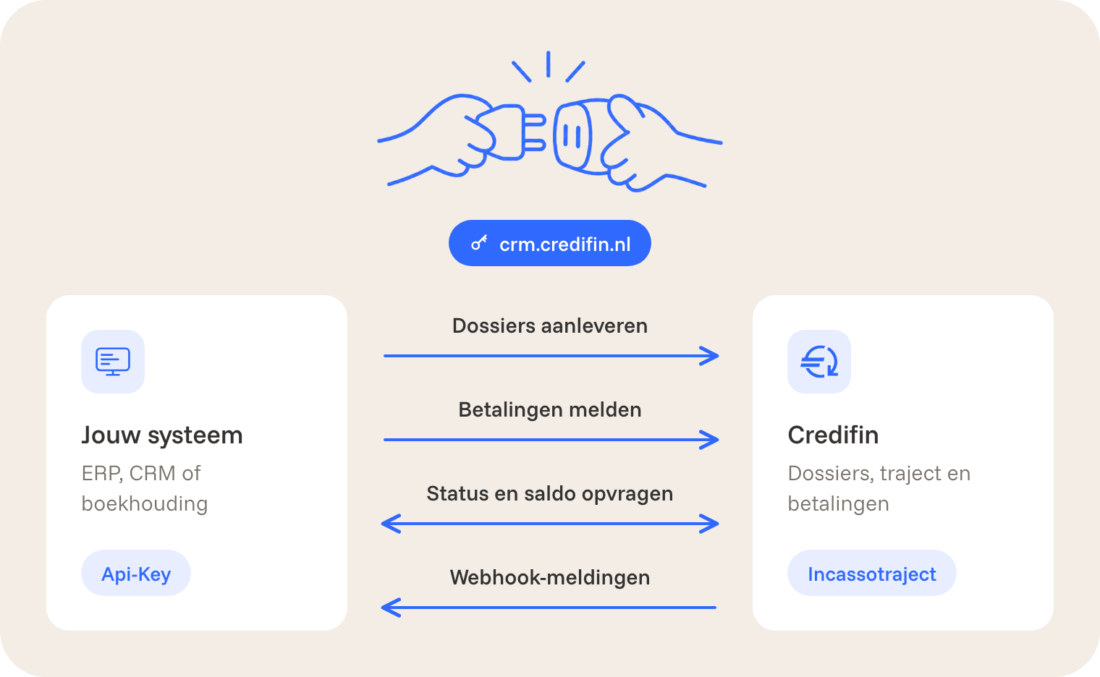
- Submitting files: accounts receivable, invoices, documents, and additional information in a single request.
- Track accounts: status, outstanding balance, and a complete financial overview including principal, interest, collection fees, payments, and credit memos.
- Report payments that the debtor has made directly to you.
- Supplement: Add additional information and documents while the case is pending.
- Receive notifications via webhooks, so you don't have to keep checking to see if anything has changed.
| Part | Value |
|---|---|
| API Address | https://crm.credifin.nl |
| Authentication | Header API Key |
| Format | JSON in UTF-8 |
| Preferred Route for New Links | POST /api/v1/files |
| Full reference | crm.credifin.nl/api/docs |
| OpenAPI 3.1 Contract | crm.credifin.nl/api/openapi.json |
Set Up in Three Steps
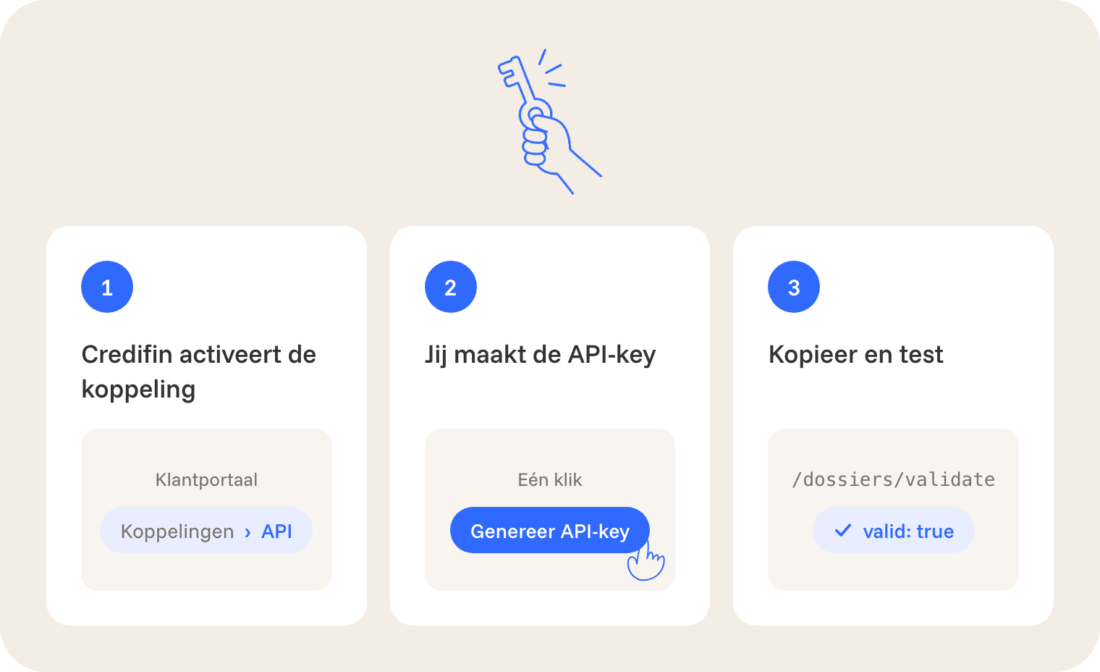
- Credifin activates the integration. Request activation through your contact person or schedule an API intake. After that, the "Connections → API" section will appear in the customer portal.
- You create the API key yourself. A customer manager clicks "Generate API Key." The name, permissions, and validity period are filled in automatically. The key begins with "cfi_live_" and remains valid until you revoke it.
- Copy and test. Store the key in a secure location, such as a password manager. Test your first request using the validation path from Step 1 of the step-by-step guide below.
The API address is the same for every client. The key automatically determines which client a request applies to. You can only view and edit your own files.
Rights of a Key
| Law (scope) | What you can do with it |
|---|---|
| files:read | Read files, accounts receivable, invoices, payments, and documents |
| files:create | Submit and update files; report payments |
| creditors:create | For agents only: Create new clients under your own agency |
Do you work as an agent for multiple clients?
You'll then receive a single key for your entire agency. Use GET /api/creditor to see which clients that key works for.
When submitting data, enter the customer number or the customer's UUID in the "creditor" field. New customers are automatically assigned the same key; you do not need to configure anything for each customer.
Authentication and Working Safely
Include the key in the "Api-Key" header of each request, using HTTPS only.
Test your connection with a simple read request: GET /api/creditor. You'll then receive your own client ID in response.
Resend Safely Using the Idempotency Key
Include an idempotency key with every POST request: a unique key for each request, such as your own order number. If you get a timeout, resend the exact same body with the same key.
Credifin will then return the same response and never create a second file. Never use the same key for a different body; doing so will result in a 409 IDEMPOTENCY_KEY_REUSED error. The key is required for POST /api/v1/dossiers.
Good Habits
- Never include the key in a URL, browser code, public repository, or log file.
- To revoke a key that has been leaked or is no longer needed, go to Connections → API and select "Revoke Key."
- Save the X-Request-Id from each request. This allows us to locate a specific request when you submit a support inquiry, without you having to share any keys or personal information.
- Each response contains X-RateLimit-Limit, X-RateLimit-Remaining, and X-RateLimit-Reset. If you receive a 429 error, wait for the number of seconds specified in Retry-After.
Legislation: What Credifin Handles Automatically
For each invoice, you only pay the principal amount. Credifin calculates the statutory interest and collection fees itself, based on the invoices, the type of debtor, and the country.
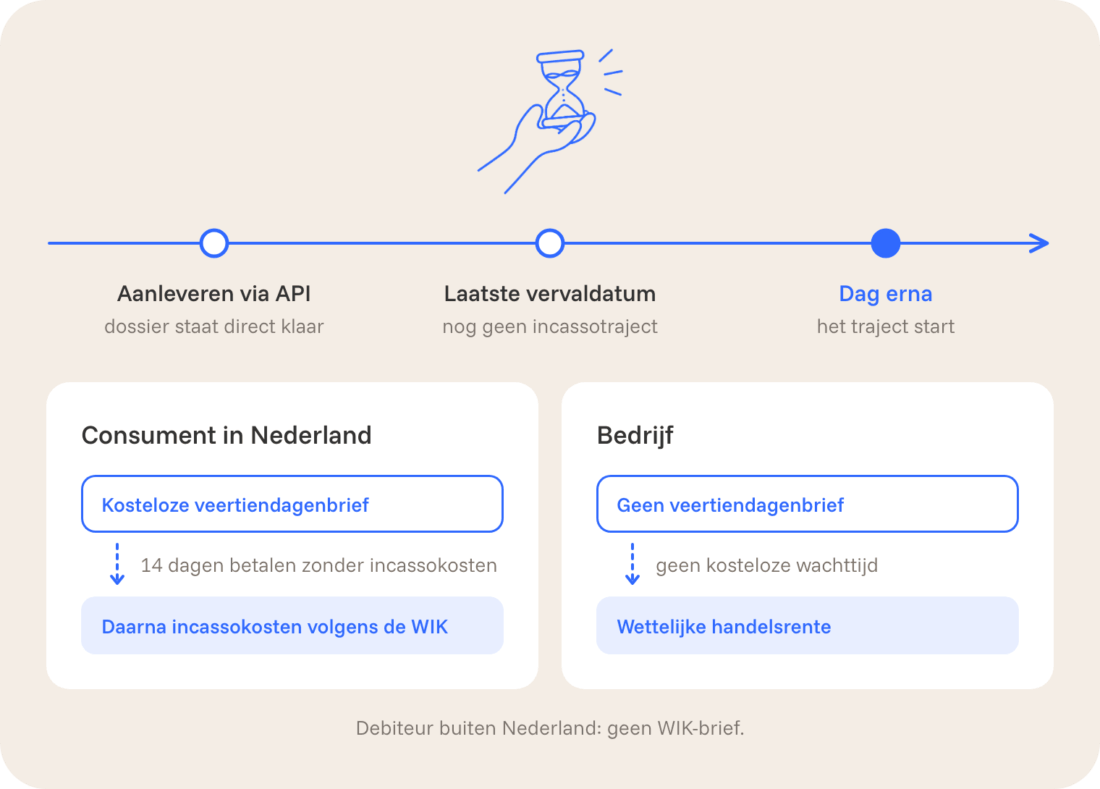
- Business or individual. If you enter your companyName or companyNumber (Chamber of Commerce number), Credifin will treat the debtor as a business. If you leave those fields blank and enter your firstName and lastName, the debtor is considered a private individual. This choice determines which rules apply.
- Dutch consumers (WIK). The process begins with the free 14-day notice. Only if that period expires without payment will Credifin charge collection fees according to the statutory scale. Within that period, the debtor can always pay without incurring collection fees.
- Business accounts receivable. No 14-day notice will be sent, and Credifin will charge the statutory commercial interest rate.
- Accounts receivable outside the Netherlands. Credifin does not send WIK letters to debtors outside the Netherlands. Therefore, always include the correct country code.
- It's never too early. The file is entered into the system immediately, but the collection process never begins before the day after the last due date you specify.
Have you already sent a 14-day reminder letter? Please check with us first so that the debtor doesn't receive a second letter.
Data Formats
| Given | Format | Example |
|---|---|---|
| Amount | Decimal number in euros, no cents | 847.50 |
| Date | YYYY-MM-DD | 2026-10-15 |
| Time in responses | ISO 8601 in UTC | 2026-10-15T09:30:00.000Z |
| Time in filters | YYYY-MM-DD HH:mm:ss | 2026-10-01 00:00:00 |
| Country | ISO 3166-1, uppercase | NL, BE, DE |
| Language | ISO 639-1, lowercase | nl, en, de, fr |
| Currency | ISO 4217, standard EUR | EUR |
| Phone number | International format | +31612345678 |
Send attachments as base64, without the "data:" prefix. Accepted file types include PDF, images (including HEIC), HTML, XML/UBL, EML, MSG, DOCX, XLSX, text, and CSV.
A file may be no larger than 10 MB. Using the POST /api/v1/dossiers endpoint, you can submit up to 25 attachments per file, with a combined total of 25 MB. Credifin checks each file for content and runs it through a virus scanner before it is saved.
Lists are spread across multiple pages. Include X-API-NEXT-PAGE (the first page is 1) and X-API-PAGE-LIMIT (default 20, maximum 200) in the request. The response returns the next page number in X-API-NEXT-PAGE; if that field is empty, you have all the data.
Step-by-Step Guide: From the First File to Full Integration
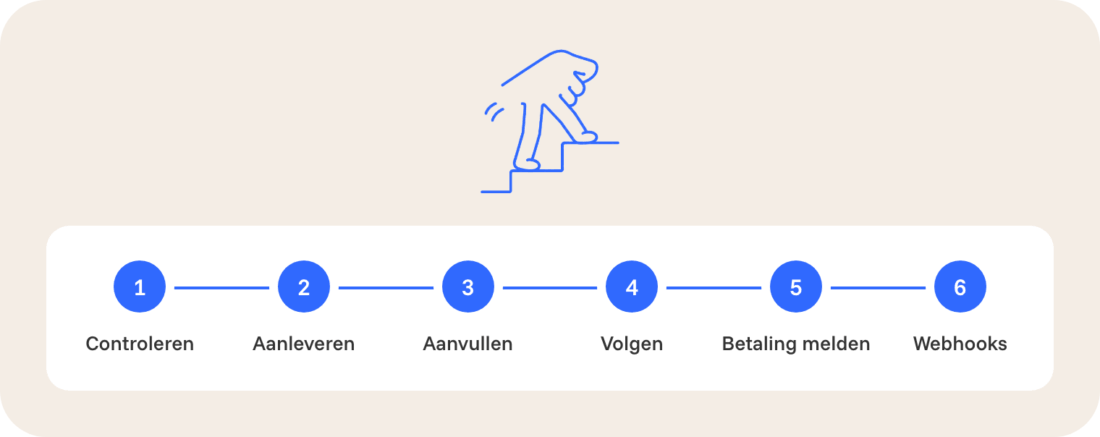
Six steps from your first test to a full integration. Examples you can copy in cURL, JavaScript, and PHP are available in the technical reference.
Step 1: Review your application without saving anything
With POST /api/v1/dossiers/validate, Credifin checks exactly the same fields as it does for a real submission. Nothing is saved, and no process is initiated. Use this endpoint during development and before your first real submission.
Send the same JSON body that you’ll actually submit later: your reference, the customer’s name, address, and language, and the invoices. If everything is in order, the API will confirm that the request is valid and that nothing has been saved, along with the number of invoices and the total amount. If something is incorrect, you’ll see what’s wrong for each field.
Step 2: Submit the application
Send the same body to POST /api/v1/dossiers, this time with a fixed idempotency key. Credifin processes the entire request in one go: either everything is saved or nothing is. This means you’ll never encounter a partially created file.
You'll receive a 201 Created response, which includes the file ID. Save it; you'll need it for all follow-up requests.
| Field | Required | Explanation |
|---|---|---|
| reference | No | Your file reference. If you leave it blank, Credifin will generate a file number. |
| creditor | For agents only | Customer number or UUID of the customer you are submitting data for. |
| debtor.reference | Yes | Your customer or debtor number. |
| debtor.companyName or debtor.lastName | Yes | Company name, or last name for an individual. |
| debtor.language | Yes | Debtor's language, for example, nl. |
| debtor.address | Yes | street, houseNumber, postalCode, city, and country. |
| debtor.email and debtor.phone | No, but recommended | With more contact information, we can reach the debtor more quickly. |
| invoices | Yes | 1 to 100 invoices, each with a reference, date, due date, and amount. |
| attachments and meta | No | Documents and additional file details—see step 3. |
If this is an individual, enter the firstName and lastName and leave the companyName and companyNumber fields blank.
Step 3: Provide additional information and documents
The more information is in the file, the more often Credifin can answer a debtor’s question right away. Therefore, please include documents and additional information, such as the contract, the invoice PDF, or a confirmation email.
Send documents as attachments: include the filename and the content as base64 for each file. Include any additional information in the meta data as a list of names and values, such as the contract number or termination date.
To add an attachment to a specific invoice, place it in the "Attachments" section of that invoice. Use standard names for each type of data, and write dates in the format YYYY-MM-DD.
You can add information later for each file using POST /api/dossier/{dossier}/meta and POST /api/dossier/{dossier}/attachment. Any field with the same name will be overwritten.
Step 4: Track the status of your cases
| Question | Directions |
|---|---|
| Which files have been modified since my last sync? | GET /api/dossier with X-API-FILTER-FROM |
| What is the complete financial status of a case? | GET /api/dossier/{dossier}/financial |
| Just the outstanding balance? | GET /api/dossier/{dossier}/open-amount |
| What is the status? | GET /api/dossier/{dossier}/status |
| Does my referral already have a file? | GET /api/dossier/{reference}/verification |
| Is there a payment plan in place? | GET /api/dossier/{dossier}/paymentplan |
Retrieve the modified records using X-API-FILTER-FROM (for example, 2026-10-01 00:00:00) and iterate through the pages until X-API-NEXT-PAGE is empty.
Step 5: Report payments you receive yourself
Did the debtor pay you directly? If so, report it using POST /api/payment. The balance, any ongoing payment plan, and the settlement will be updated immediately, and your case manager will see the notification.
Please include the file number, the amount, the receipt date, and your own reference number—for example, the bank statement number.
We post payments to Credifin’s third-party funds account ourselves; you do not need to report them. That is why this route only accepts payments that you have received. If this feature is still disabled for your organization, you will receive the error message PAYMENT_REPORTING_NOT_ENABLED. In that case, please ask us to enable it.
Step 6: Receive notifications via webhooks
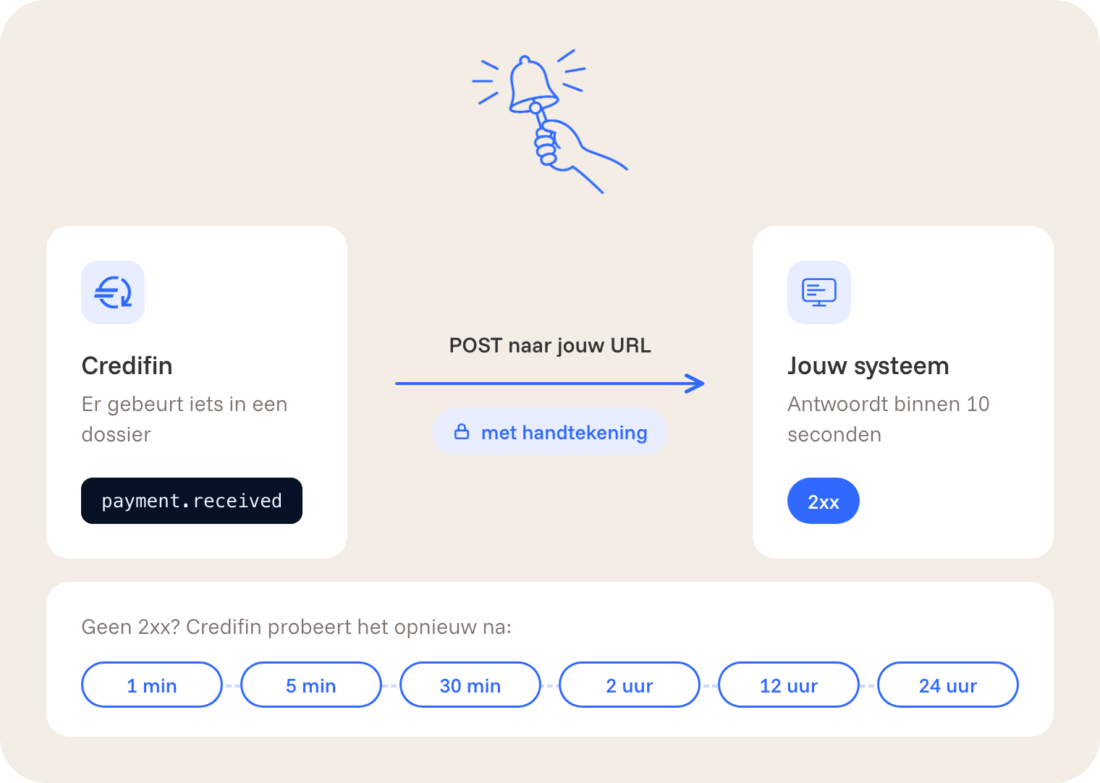
Instead of constantly asking if anything has changed, have Credifin send you a notification. A client manager adds a URL under "Connections" → "Webhooks," selects the events, and receives a one-time secret key to verify notifications. Credifin enables webhooks on a per-client basis.
| Event | When |
|---|---|
| file.created | A new file has been opened for you. |
| file.status.changed | The status of a file has changed, including when it is closed. |
| file.paid | The outstanding balance has been cleared. |
| paymentplan.created | A payment plan has been established. |
| payment.received | A payment has been posted, either at Credifin or with you. |
| invoice.created | An invoice has been added to the file. |
| credit note created | A credit memo has been posted. |
| cost.created | A cost item has been added. |
| courtcost.created | Court costs have been recorded. |
| note.added | A practitioner has posted a message that you can see. |
| communication.sent | Credifin has sent the debtor an email, letter, or text message. |
| communication.received | The debtor has responded via email. |
| phone.call | A call was made to the debtor, or an attempt was made to call them. |
| debtor.updated | A customer's information has been updated. |
| debtor.contact.updated | A debtor's address or contact person has been changed. |
| creditor.created | For agents only: A new client has been created under your agency. |
| webhook.test | Test notification from the customer portal. |
Each notification is a POST request containing JSON and the headers Credifin-Event, Credifin-Event-Id, and Credifin-Signature. Verify the signature: compute the HMAC-SHA256 hash of the timestamp, a period, and the raw body, using your secret as the key. Compare the result with v1 from the header. Reject messages whose timestamp differs by more than five minutes. An example in Node.js and PHP is provided in the technical reference.
- Reply quickly. Confirm within ten seconds with a 2xx status code, and then process the request. Redirects are not followed.
- Make-up exams. If a notification fails, Credifin will retry after 1 minute, 5 minutes, 30 minutes, 2 hours, 12 hours, and 24 hours. After 50 consecutive failed attempts, the webhook will be paused.
- Twice or in a different order. A notification may be received more than once. Save the ID and ignore duplicates. Use `occurredAt` to determine the order.
- Testing. When you click "Send Test" in the portal, you'll immediately receive a test notification and see your server's response.
File Statuses
| Status | Meaning |
|---|---|
| Open | Pending, including the free 14-day period. |
| payment plan | A payment plan is currently in effect. |
| promise to pay | The debtor has made a promise to pay. |
| paused | Temporarily suspended, for example, in the event of a dispute. |
| closed | Completed and paid for. |
| unpaid | Closed without full collection. |
The "fileClosed" field shows at a glance whether a file has been closed.
Errors and Support
In your own software, use the hard-coded value from an error message, not the human-readable text; that text may change. Only retry a request if `retryable` is set to `true`, and use the same `Idempotency-Key` when doing so.
/api/v1 routes return errors as application/problem+json. The existing /api/... routes use an error object with similar fields.
Each error message contains a fixed code, a human-readable explanation, a requestId, and a retryable. In the case of a validation error, the message specifies what is wrong for each field; for example, the field invoices[0].dueDate with code INVALID_DATE.
| HTTP Status | Meaning |
|---|---|
| 200 OK | Success. This also works when creating via the existing /api/... routes. |
| 201 Created | File created via POST /api/v1/files. |
| 400 Bad Request | The body is not valid JSON. |
| 401 Unauthorized | The key is missing, has expired, or has been revoked. |
| 403 Forbidden | The key is not authorized to do this, for example, due to a missing permission or a different client. |
| 404 Not Found | Not found within your client's account. |
| 409 Conflict | Duplicate reference or an Idempotency Key that has already been used for another body. |
| 413 Payload Too Large | The request or an attachment is too large. |
| 415 Unsupported Media Type | Incorrect Content-Type or an unsupported file type. |
| 422 Unprocessable Entity | A field does not comply with the rules; see errors. |
| 429 Too Many Requests | Too many requests; please wait for Retry-After. |
| 500 Internal Server Error | Error on our end; please try again safely using the same Idempotency Key. |
| Code | When | What to do |
|---|---|---|
| CREDITOR_REQUIRED | An agent key submits a request without a creditor. | Include the customer number or the customer's UUID. |
| CREDITOR_MISMATCH | The client in the body does not correspond to this key. | Omit the creditor or use the correct key. |
| IDEMPOTENCY_KEY_REUSED | The same key with a different body. | Use a unique key for each request. |
| CASE_CLOSED | Payment, credit memo, or charges on a closed file. | Please contact us to request a correction. |
| PAYMENT_REPORTING_NOT_ENABLED | Payment reporting is disabled for your organization. | Please ask us to enable this feature. |
| DOCUMENTS_NOT_ENABLED | Documents have not been made available to your organization. | Please ask us to enable this feature. |
| FILE_BLOCKED | The attachment contains dangerous content, such as a PDF with a script. | Please send a regular PDF or image. |
| MALWARE_DETECTED | The virus scanner has detected malware. | Check the source system; the file has not been saved. |
Are you having trouble figuring it out?
Please send us the X-Request-Id (or requestId) of the request, the time, and the route. Never include your API key. This will allow us to locate the request and review it with you.
Want to spar about your API connection?
Do you have a concrete use case or want to know what's technically possible with the Credifin API? Schedule a quick call with our team and we'll think with you about the best setup.